Wedding guest management

Every guest checked in and seated — without the clipboard.

The all-in-one check-in and seating platform for weddings. Guests scan their own QR at the door, tables never overfill, and you see it all happen live.

Guests scan with their own phone camera — nothing to install, and nothing to hand out at the door.

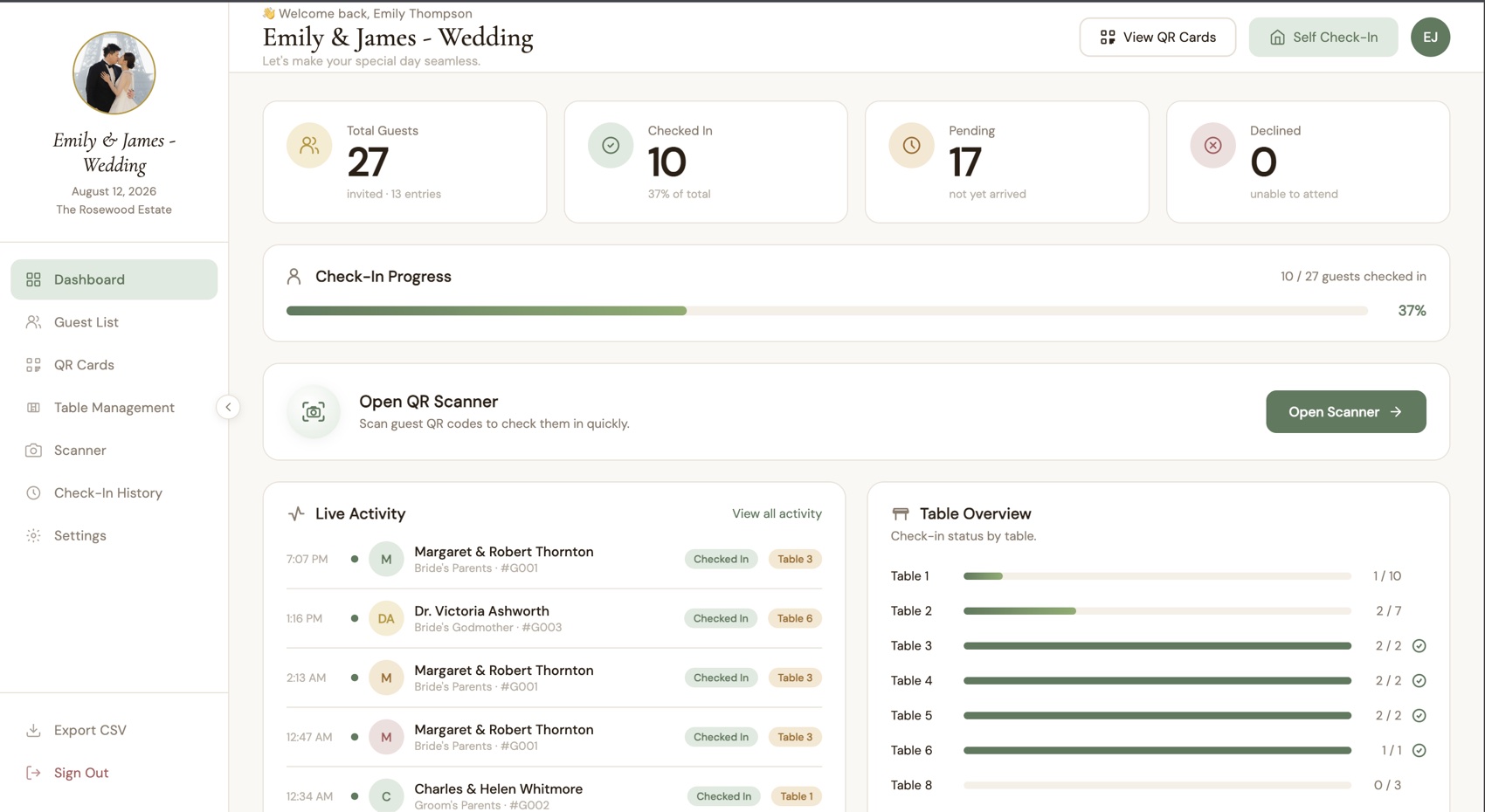
The EverAfter dashboard showing live check-in progress and table overview
EJ
Emily & James
✓ Checked in Table 6
Features

Everything the door needs, in one screen.

Built for the 45 minutes when everyone arrives at once — the moment a spreadsheet gives up.

QR check-in

Every guest gets a personal QR code. Scan it with any phone camera — no typing, no scrolling a list with a queue behind you.

Self check-in station

Put a tablet at the entrance and guests find their own name and check themselves in. Their table appears on screen instantly.

Seating that can't overfill

Assign parties to tables and the system refuses to seat 12 people at a 10-seat table — so you find out now, not at the reception.

Live arrival board

See who's arrived, who's pending, and the percentage checked in — updating by itself while multiple staff scan at different doors.

QR codes by email

Send every guest their own QR invitation in one batch. Import your existing list from CSV — columns are matched by header, any order.

No double check-ins

Scan the same code twice and it's blocked, showing exactly when they arrived. Every action is logged — who checked in whom, and how.

How it works

Four steps, start to aisle.

STEP 01

Import your guest list

Upload the spreadsheet you already have. Names, parties, categories and tables come across in one go.

STEP 02

Send their QR codes

Each guest receives their own QR by email — attached as an image so it works even offline at the venue.

STEP 03

Scan at the door

Your team scans with a phone, or guests check themselves in at the station. A party of four takes one scan.

STEP 04

Watch it live

The dashboard fills in as people arrive, so you can answer "how many are here?" without counting anything.

Try it yourself

Walk through a real wedding — no sign-up.

Sign in with the demo account below and you'll land in a live event with 13 guests, 8 tables and a full check-in history already in place. Scan, seat, undo — poke at anything.

This is a shared sandbox that everyone uses, so please leave it in one piece.

Email
demo@everafter.com
Password
demo123
Open the live demo
Pricing

One price, for one perfect day.

Pay per event — no subscription, no per-guest surprises.

Intimate
Rp 1.500.000
per event

For a single wedding with a close guest list.

  • Up to 150 guests
  • QR check-in + self check-in station
  • Seating & table management
  • QR codes by email
  • CSV import & export
Choose Intimate
Most popular
Classic
Rp 2.900.000
per event

For a full reception with staff at the door.

  • Up to 400 guests
  • Everything in Intimate
  • Unlimited staff accounts
  • Live arrival dashboard
  • Priority support on the day
Choose Classic
Planner
Custom
billed yearly

For organizers running several weddings a season.

  • Unlimited guests
  • Multiple events in one account
  • Everything in Classic
  • Onboarding for your team
Talk to us

Not sure which fits? Tell us your guest count and date and we'll point you to the right one.

FAQ

Questions we get before the big day.

Do guests need to install an app?

No. They show the QR code we email them, or check themselves in at the station — which runs in a normal browser. Nothing to download, on either side.

What if a guest loses their QR code?

Your team searches their name and checks them in manually in seconds. The QR is a shortcut, never a requirement.

Can several staff check guests in at once?

Yes. Multiple people can scan at different doors and everyone sees the same live numbers — no edit conflicts, no stale view.

What stops someone being checked in twice?

A second scan is rejected and shows when that guest already arrived. Every check-in and undo is written to an audit log.

Can I bring the guest list I already have?

Yes — import a CSV. Columns are matched by their headers in any order, and only the name is actually required.

How are parties and plus-ones counted?

Each invitation carries its party size, so one scan checks in the whole group and your totals count people, not rows.